Importundo

WordPress plugin · v2.0.0 · free and open source

Import a spreadsheet. Undo it.

Importundo updates your pages, posts and products from a spreadsheet. Before it writes anything, it shows you every change. If you don't like the result, one click puts everything back.

Free, no account No developer needed Undo for 30 days Nothing leaves your site

furniture-feed-q3.csv · 6,412 rows · matched on SKU

Five rows of a CSV file, shown as they are checked, imported and rolled back
Row Would do Did Reverted Product Status Price Category On the site
4 Update Updated Restored Nordic Oak Chair draftpublish 249.00199.00 Seating #418
5 Create Created Deleted Oak Dining Table 180 publish 899.00 Tablesnew term
6 No change Not written Never touched Linen Two-Seater Sofa publish 1,290.00 Seating #421
7 Update Updated Restored Brass Floor Lamp publish 129.0099.00 LightingLighting, Sale #442
8 Create Created Deleted Ash Bar Stool draft 159.00 Seating

2 to create 2 to update 1 unchanged 0 errors

Nothing has been written. This is a check, not an import.

Import #12 finished in 41s. Undo available until 25 August.

2 deleted, 2 restored — including the date each was last modified.

Five rows from a real import. Press the three buttons in order. Row 6 already matches the site, so it is never touched.

How it works

Three steps

You see every change before it happens. You can undo all of it after.

Step 1

Pick your file

Use the file your supplier sent, or export your own content and edit it in Excel or Google Sheets. The plugin matches the columns to your site and shows real values next to each one, so you can see if a column is wrong.

It remembers the matching for next time.

Step 2

Check it first

One click checks every row against your site. It tells you what will be added, what will change, what is already correct, and which rows have a problem.

Nothing is written yet.

Step 3

Import, then undo if needed

The import runs on your web server, so you can close your laptop.

If the result is wrong, one click puts everything back — any time in the next 30 days.

Uses

What people use it for

The changes that are too big to do by hand.

Most import tools tell you what they did after it is done. This one shows you first, and can undo it after.

The rest works like any other WordPress plugin. Install it, open it, pick a file.

  • Change pricesEdit one column in a spreadsheet to change prices across the whole shop. Products with no change are not touched.
  • Move content inBring in content from an old site, a supplier's list, or a client's spreadsheet.
  • Fix one thing everywhereChange a phone number, an opening time, or a name on hundreds of pages at once.
  • Let someone else run itA colleague can run the monthly update. Every import can be undone, so a mistake is not a disaster.

Screenshots

The two main screens

One shows what will change. One lets you undo it.

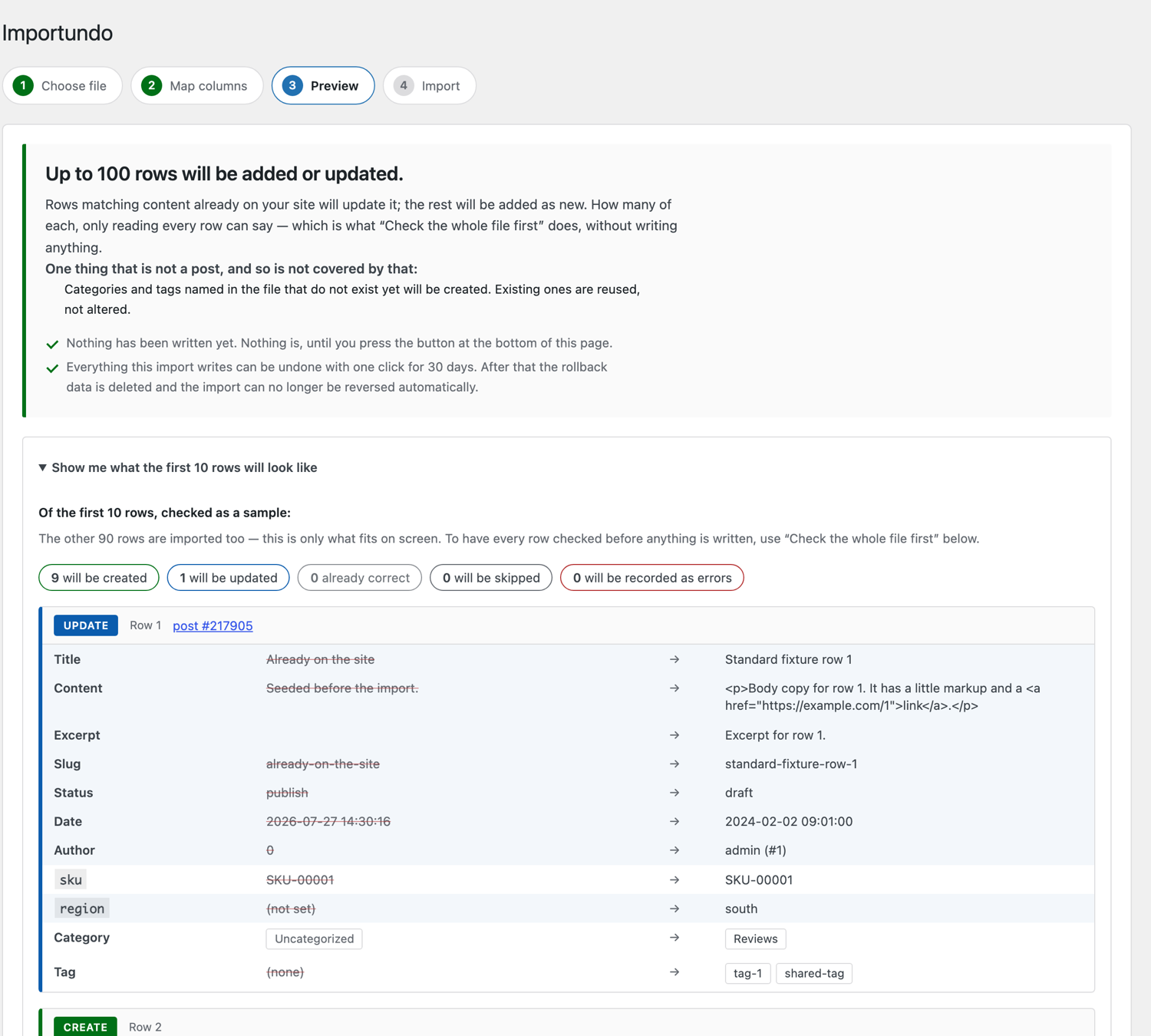
The preview step showing row 1 as an update, with each field's current value struck through beside the new value
BeforeEach row is marked new or changed. You see the current value and the new value. Nothing has been written yet.
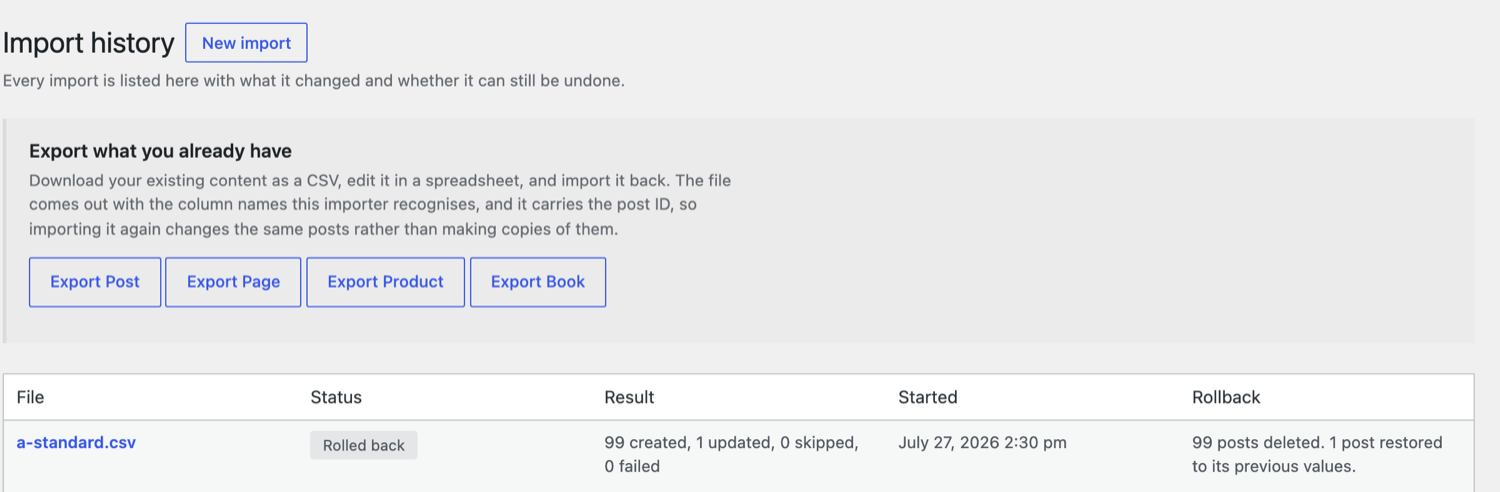
Import history after an undo, showing the entry marked rolled back with 99 posts deleted and 1 post restored to its previous values
AfterThe history shows what each import did, who ran it, and what the undo removed and restored.

Want the full walkthrough? Read the five-minute guide →

Price and privacy

Free and private

Price

Free to use

Everything on this page is free, with no account and no licence key. A paid Pro add-on adds extras for heavy users and funds the work.

Privacy

Nothing leaves your site

No tracking and no sign-in. Nothing is sent anywhere. Everything runs on your own site.

The undo

The undo is tested

Before every release, an automated test imports each sample file, undoes it, and checks the site is exactly the same as before. What undo covers →

Your plugins

Works with WooCommerce and ACF

Products are saved as real shop products, with prices, stock and variations. Custom fields go where your site expects them. Products → Custom fields →

Questions

Common questions

Do I need a developer?

No. If you can edit a spreadsheet, you can use it. The plugin handles the WordPress side.

Is it safe on a live site?

The check step writes nothing, so you can look at the numbers first. If the import goes wrong, you can undo it for 30 days. For very large jobs, test on a copy of your site first.

Will running the same file twice create duplicates?

No, if you tell it what makes a row unique — a product code or a title. Then it updates instead of creating copies. If you have not set one, it warns you before the import starts.

What happens to rows with a mistake in them?

A bad row does not stop the import. The plugin lists each bad row and says what is wrong and how to fix it. You can fix those rows and run just them again.

Can I close my laptop while it runs?

Yes. The import runs on your web server, not in your browser. You can close the laptop and check the history page later.

What does it cost?

The plugin is free, and everything on this page is in the free plugin. Importundo Pro is a paid add-on for heavy users: €59 a year for one site, €199 a year for unlimited sites. It adds import from a web address, saved templates, export, and a longer undo window. What Pro adds →

Is the undo a backup?

No. It undoes one import and touches nothing else. Keep normal backups too.

All questions →

Try it with the sample file

The plugin comes with a sample spreadsheet. It imports cleanly on a fresh site and undoes itself after. It takes five minutes and touches nothing of yours.